How to render a movie file as texture in Blender

I’ve been playing with a new title sequence for shiny new gaming channel, and I thought it would be fun to have a movie file playing on a plane object that’s seen as a screen in a cinema. I knew this was possible in Blender, but I didn’t quite know how to achieve it. After some tinkering I found out. Let me share my findings with you.

It’s very simple actually: setup a material, including a Texture Node, but instead of an image file, we pick a movie file (or image sequence). That’s really all there’s to it. The difficult part is understanding the settings in the Texture File though.
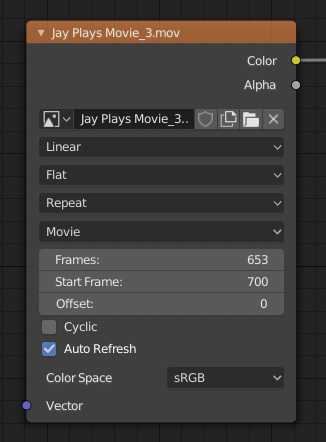
In the fourth drop-down, Movie was selected automatically when I added my movie file. This can be changed to Image or Image Sequence though, just in case yours is not set correctly. For the record, I’m using an MP4 file with H264 encoding, at 60 frames per second. The three following options are interesting (and important).

Read more

How to use the Blender Cloud Add-On

I’ve been a member of the Blender Cloud since 2016, and one of the benefits you get is that your local copy of Blender can interact with… well the Blender Cloud. You can access texture files, HDRIs, save your files, upload your renders and work in progress – all without leaving Blender. That’s cool! What …

Read more

Distributing Props for DAZ Studio

Making props for DAZ Studio can be fun and easy. Typically you’ve modelled something in your favourite 3D app, UV unwrapped it appropriately, then you import the object into DAZ Studio and setup your surface properties. You can save your work as part of the whole scene, or you can save your selected item on its own.

Bringing our prop back into other scenes on your own computer will probably work just fine, but if you intend to share your work with others, things get a little more complicated. Let’s take a look how we can do it in this article.

Read more