Unreal Engine continues to surprise me with idiotic things that shouldn’t happen, like some objects not rendering in Movie Render Queue, for absolutely no obvious reason. I’ve had this before, forgot to make a note, but thankfully remembered a trick that is saving my bacon time and time again.
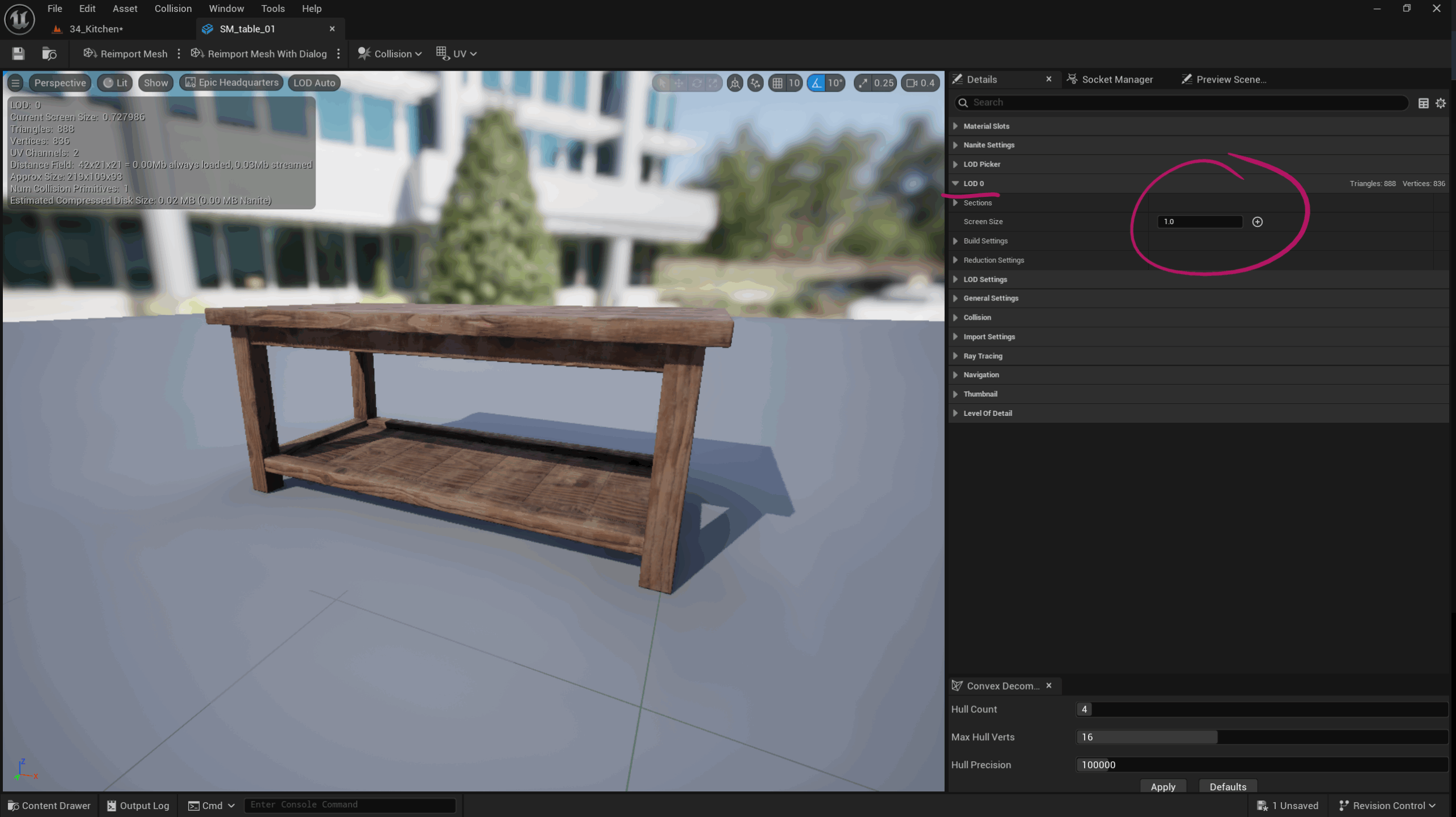
Turns out some assets LOD0 screen size is set to zero by default. In such cases, MRQ does not render them. If we set that parameter to 1 or higher, they’ll render just fine.
To change this on a per-object basis, find it in the Content Browser and double-click to open it. Find the LOD0 section on the Details panel.
Adding Game Override Render Settings
Sadly the above option is not exposed through Property Matrix, which means we can’t change this value for multiple objects at the same time. Having said that, there’s also an option to add Game Override options to MRQ that can prevent invisible objects.
- disable “Use LODZero”
- and disable “Disable HLODs”

Thanks to WildChildStudios for this tip.
Why does this happen?
Update, September 2026: I never quite understood why this works, only that it does, so here’s the mechanism as best I can piece it together.
Every static mesh carries a screen-size threshold per LOD. The number describes how large the object has to appear on screen before that LOD is allowed to be used. LOD3 might kick in at 0.1, LOD1 at 0.5, and LOD0 – the full-detail mesh – is normally greyed out at 2.0. That value is deliberately absurd (nothing is ever twice the size of the screen), because LOD0 is meant to be the “always available” tier that can never be culled by distance. Unreal computes it for you as long as “Auto Compute LOD Screen Size” is ticked.
Some assets arrive with that box unticked and LOD0 left at zero. I’ve mostly seen this on Fab packs that were authored with their own LOD chains, or on meshes exported from another DCC with explicit LOD settings, but it can happen with any import. A threshold of zero is meaningless: it tells the engine “use LOD0 once the object covers zero percent of the screen”. In the regular editor viewport this doesn’t matter, because the viewport’s LOD picker walks the chain from coarse to fine and settles on LOD0 anyway.
MRQ takes a different path. Its Game Overrides preset ships with “Use LOD Zero” enabled, which forces every mesh to LOD0 regardless of distance, and “Disable HLODs” enabled for the same reason. That forced path trusts the authored screen-size values rather than falling through the picker, and a zero there reads as “this LOD is never valid”. The mesh has nothing to draw, so it’s simply gone. The viewport never trips over this because it never takes the forced path.
That’s why both fixes work, and why they’re really the same fix from opposite ends: setting LOD0 to 1 gives the forced path a valid threshold, while disabling the two overrides stops MRQ from taking the forced path at all. It also explains the apparent randomness: a pack that mixes Nanite meshes (which don’t use the LOD chain for rendering) with regular ones will lose only the regular ones, which looks a lot like the engine deleting half your set for no reason.
If you have a whole set of affected meshes, I’ve written a Python script that fixes them in bulk.
I hope this helps, and good luck out there!