We wanted to tweak the ever-so-slightly-excessive wind speed that’s part of the procedural grass in Brushify. This took some research, but a video by Joe Garth greatly helped me understand where to look for the setting.
Each landscape layer’s layer info gives a clue where to start your reverse-lookup research. Select the landscape, then switch into landscape mode and select the paint option to expose the layers. In my case, I was after Grass_LayerInfo.
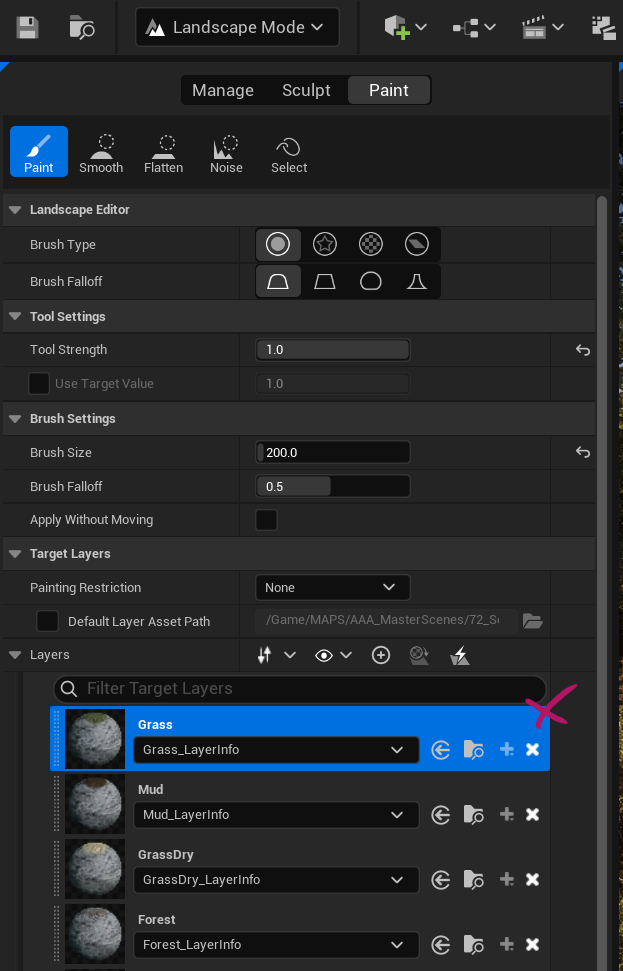
Grass is what we’re looking for, specifically a group that contains all objects that are spawned onto the grass layer. Those can be found under
- Brushify
- Materials
- Landscape
- GrassTypes
When we open up LG_Grass, we find a list of meshes that will spawn. We can add/remove as we please, and also set procedural parameters for density, size, cull distance and much more. Find out the mesh with the wind problem (thankfully it was the first in my list), then open it (S_Grass in my case).
Said mesh will lead us to the material instance used on the mesh (MI_Grass in my case), all of which can be found in
- Brushify
- Materials
- Landscape
- ProceduralMeshes
- Foliage
- Grass
Open it and find the section “7 Wind Bending”. I’ve disabled directional wind and reduced the parameters for Simple Grass Wind Intensity and Wind Weight, and voila – we get a much more palatable result than the defaults.
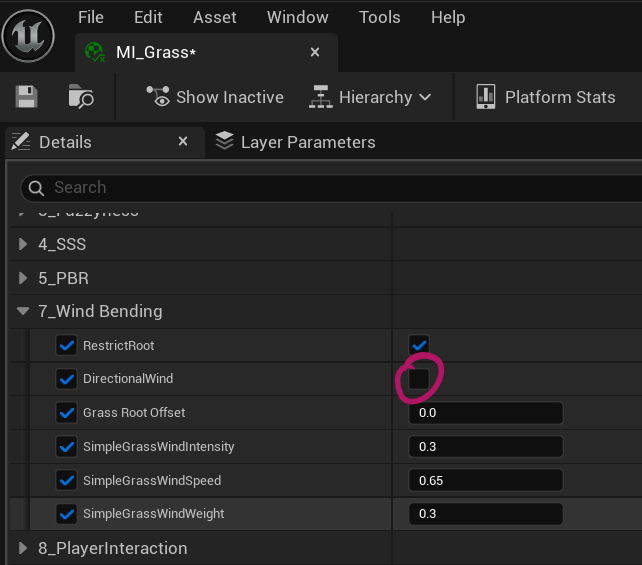
Repeat the same for each mesh in the collection (flowers, clovers, etc) for each mesh in the layer. Hope this helps both you and me when we need to make a similar tweak in the future.