I ran into a small puzzle while importing Daz clothing into Character Creator using Transformer. The garment in question was a multi-part suit that consisted of a shirt, a vest, pants and a jacket. Although all were named correctly, Transformer displayed random names during import, and as such it was impossible for me to specify the correct layers for my clothing.
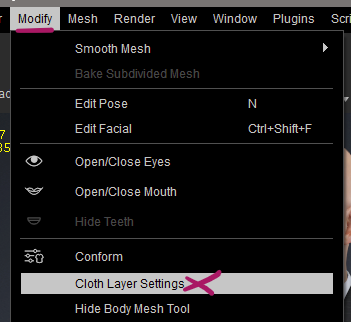
The import itself worked fine, and I could rename my clothing, but I couldn’t quite work out where CC would save the respective layer information, or where to change this after import. A few minutes of undeterred Googling, bad AI advice, digging through cryptic menus and bizarre icons revealed the information: from the Top Menu, we choose Modify – Cloth Layer Settings. Works in both CC4 and CC5.
This will bring up a list of clothing in our scene, showing the current layer order. Clicking the little gear/sun icon next to an item will let us make a change.
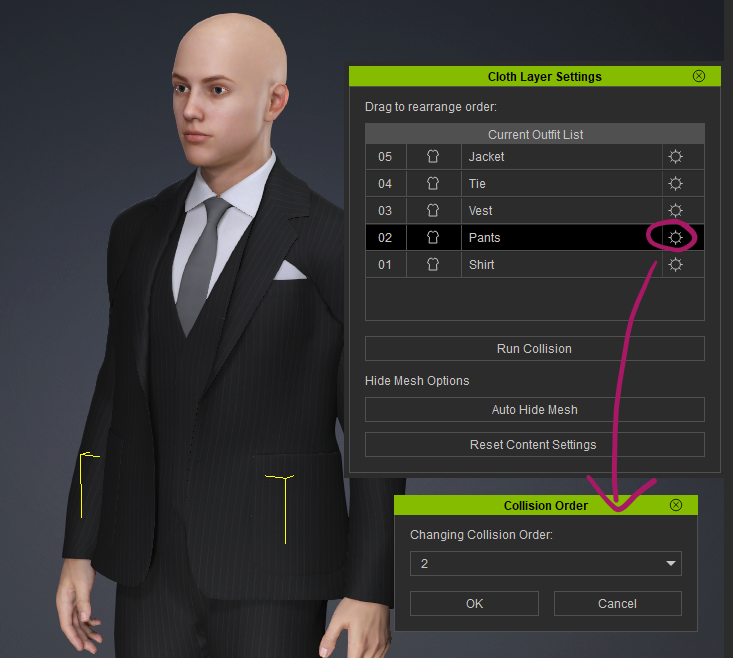
Interestingly I found out that the layer order in my case was detected precisely and I didn’t have to make any changes, but now I know where it can be done.
And so do you 😎