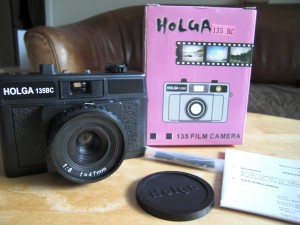
I’ve had my eye on this camera for a while – like every Holga Nut I imagine… who could resist the temptation of another Holga, especially if it’s different to the ones we know and love? Unlike its big brothers, this one takes standard 35mm film and produces 24x36mm negatives – easily processed on the High Street.
I rushed down to the Photographer’s Gallery last week to get the Holga 135BC, and I couldn’t wait to try it out. But before I show you the breathtaking results, here’s what this camera is all about.
There are two versions: the Holga 135 and the Holga 135BC. As I understand it, the only difference is a pink sticker on the BC version, and the fact that BC stands for “black corners”. This one should produce stronger vignetting, while the non-BC version shouldn’t.
Although there are no clues on the package or the manual, it’s fair to assume that this little baby is made by Tokina in Hong Kong, along with the rest of the fabulous Holga family.
What’s in the Box
We have the following ingredients at our disposal:
- 1x Holga 135BC (nice!)
- 1x Lens Cap with HOLGA written on it (I think all the new ones have that since 2008/2009)
- 1x pink box with example photos, a “drawing” of the camera featuring some monkey sticker. Note that the word “Holga” is written in a different font than what’s on the lens cap, the camera and previous boxes (I guess they’re not branding specialists – which makes it more attractive to me)
- 1x user manual
- and one of those hand straps that you *can* attach, although nobody in their right mind ever would
The Outside
Plastic. Cheap plastic, that’s what we like. But unlike his bigger brother, this one is really well built. The back doesn’t come off completely (it’s hinged, like on a proper camera). There’s a film counter on the top (just like on a proper camera), and the shutter button is at the top, not next to the side of the lens. Speaking of which, you can screw in a cable release for long exposures.
As for features, they’re almost identical to the 120 version: at the bottom, you’ve got a switch for “normal” and “bulb” settings, so double-exposures or as-long-as-you-press-the-button exposures are back with a vengeance. Of course there’s a standard tripod mount. Nice!
On the top there’s a hot shoe for an external flash, and we also have that notorious aperture switch. Just like the 120 version, it technically works, but both apertures are the same. Should make for easy modding I would hope. The lens barrel (if you want to call it that) has the same outer dimensions as the 120 version, so all accessories should fit like a glove. I love it when manufacturers do that!
The Inside
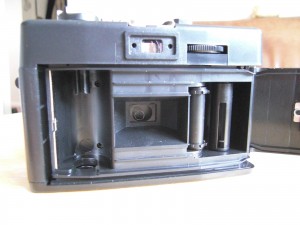
Under the hood, things look a bit different. The film winds from left to right, like on standard 35mm cameras. However, it unwinds counterclockwise (as determined by the cartridge), and winds into the camera clockwise. I’ve not seen that before! It’s a great idea though, because it makes the film less curly when you come to handle it for processing or scanning. If this is in fact the reason behind it, who knows.
Tha back pops open by lifting the film rewind knob. You wind the film with a wheel at the top right, like on a disposable. Film transport is done by a sprocket next to the film chamber, and a 1cm thick take up spool. All the components, like the rest of the camera, have a very sturdy feel to it.
If you look closely at the film chamber, you can see a translucent mask behind the lens that covers the corners – the responsible part for creating that great vignetting effect.
Hello Jay, have you ever tried the Diana Mini? I can’t decide between the Holga 135 and the Diana Mini :S
That’s a difficult one, Nicolas. I would perhaps go with the Diana Mini and shoot the square format. It’s a bit smaller than the Holga 135 – it reminds me of the Holga 120.
Why not get both 😉
Hi Jay, thanks for the review.
I just want to be sure snapping multiple exposures is possible before I buy it. You mentioned it, but I read somewhere that it is not possible with the Holga135. Have you snapped any multiple exposures?
Also, is it possible to crank a little less than normal so you end up with an “endless panorama”?
And it seems like the camera cannot project the image over the film sprockets, correct?
Hi Robert,
Yes you can definitely shoot multiple exposures on the same frame. The shutter button and the film winder are not linked so you can go crazy, just like on the Holga 120.
I’ve never tried to half-forward the film to create endless panoramas, and I haven’t got my Holga with me right now so I can’t test it for you. My guess is it’ll work though.
The Holga 135 does not expose the sprockets as you said, it creates proper 24x36mm pictures per exposure.
Hope this helps 😉
I really liked the review! I really want to get a Holga 135bc but do you think this would be a good camera for a beginner? I have no experience AT ALL when it comes to cameras but the results just look so good and the camera is cute too. I know the film is easy to buy so that’s a plus, but would this be the right camera to get?
Hi Katy,
Glad you liked the review – I can’t believe it’s over 2yrs old. Time melts away like the snow in the sun…
I think the 135BC is a superb camera for a beginner. There’s no other camera I’d recommend for you. There are literally no controls (other than focus guesstimate and the sunny/cloudy slider) and you can’t really make mistakes in Regis to the film or processing. As long as it’s a bit sunny outdoors, and the sun is behind you, you’ll get some quirky results.
I’ve seen some great colours the other week at Urban outfitters, like mint green or purple, but I resisted because I have so many cameras already…
Use 400 ISO film or higher and you’re good to go. Go for it and most of all have fun 😉
Hi Jay,
Great review – thanks 🙂 you have inspired me to buy a Holga 135 BC and would love your advice on accessories…filters, self portrait attachment, colour filter flash etc etc…what would you recommend? I’m off to NYC next month and would love to take this in my handbag to take some special shots over and above my digital camera…also, what is the cable release adaptor used for? (apologies if this is obvious!!) Thanks – I have so many questions but maybe need to start with this lot lol!
Hi Carol,
Glad I could inspire you 😉 Well accessories are plentiful indeed, but to be really honest I wouldn’t use any of those you’ve mentioned. Apart from filters perhaps, but a well placed Quality Street wrapper s as good a Holga filter as one that you can buy as an accessory. I’d say get the camera and shoot a few rolls with it plain, see what you think. I love what the 135BC can do with black and white film.
The cable release is for long exposures, and hence to avoid camera shake. It means you don’t have to touch the camera to press and hold the shutter down.
Enjoy your trip, say hello to NYC for me 😉
Hi!!
Thanks for the review!
I’m from Brazil and I’m going to Miami next week. I wonder where you bought it or if you can indicate a store where I can find a Lomography Camera.
Thank you!!
Hi Amanda,
There are a couple of shops on Lincoln Road that sell lomo cameras, smaller gift boutiques whose name escapes me. Your best bet is probably Urban Outfitters on Collins and 7th. They have the Holga 135 models in several cool colours.
Hope this helps 😉
😉
Nice review, nice pics.