Have you ever wondered how most 3D apps have an option to export FBX files with embedded textures, except for Blender? There’s usually a very obvious tick box that says something like “embed textures”. Granted the feature isn’t fantastic, because it can only reference the base colour and not a full set of PBR maps (or rather it technically can with non-standard hacks, but it being all closed-source Autodesk madness, it’s not something that could ever work reliably across 3D applications).
Turns out Blender CAN embed textures into FBX files! However the devs made sure you’ll never accidentally come across this feature, so let me show you how it can work:
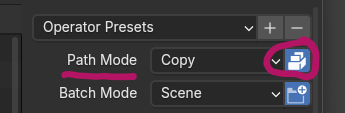
- in the FBX export dialogue, take a look at Path Mode
- it’s set to auto by default
- set it to copy instead
- now notice that little eraser icon turn from “grey” into “ever so lightly lighter grey”
- now click that icon (it says “embed textures” when you hover over it
- boom, the icon turns into a little car (who picks these icons at the Blender Institute???)
Insanity! Now your file contains embedded textures! Obviously there’s only a 0.0000001% chance that those will work in your target application, but that’s the FBX Lottery we love so much when dealing with multiple 3D applications.
On the off-chance that it’ll actually work for you: congrats!